intro-to-html
What is HTML?#
(Hypertext Markup Language) is not a programming language. It is a markup language that tells web browsers how to structure the web pages you visit. It can be as complicated or as simple as the web developer wants it to be.
Not a Programming Language#
Programming languages have functional purposes. HTML, as a markup language doesn’t really “do” anything in the sense that a programming language does. HTML contains no programming logic. It doesn’t have common conditional statements such as If/Else. It can’t evaluate expressions or do any math. It doesn’t handle events or carry out tasks. You can’t declare variables and you can’t write functions. It doesn’t modify or manipulate data in any way. HTML can’t take input and produce output. Think of it this way: you can’t compute the sum of 2 + 2 in HTML; that’s not what it’s for. This is because HTML is not a programming language.
The History of HTML:#
HTML was first created by Tim Berners-Lee, Robert Cailliau, and others.
Hypertext it's mean that you can move around the web by clicking on special text called hyperlinks which bring you to the next page, which hyper just means it is not linear — i.e. you can go to any place on the Internet whenever you want by clicking on links — there is no set order to do things in.
A Markup Language is a way that computers speak to each other to control how text is processed and presented. To do this HTML uses two things: tags and attributes
The latest version is known as HTML5.
Basic HTML Structure For Web Page#
Here are the tags that pretty much any HTML page should have:
<!DOCTYPE html>: This tag specifies the language you will write on the page. In this case, the language is HTML 5.<html>: This tag signals that from here on we are going to write in HTML code.<head>: This is where all the metadata for the page goes — stuff mostly meant for search engines and other computer programs.<meta>- This is a tag for providing metadata (data about our data) to the page. We can use meta tags to display what character set we are using or for SEO (Search Engine Optimization) purposes.<title>- This tag gives the page a title that can be displayed in the tab of your browser.<body>: This is where the content of the page goes.

This is how your average HTML page is structured visually.
HTML Elements:#
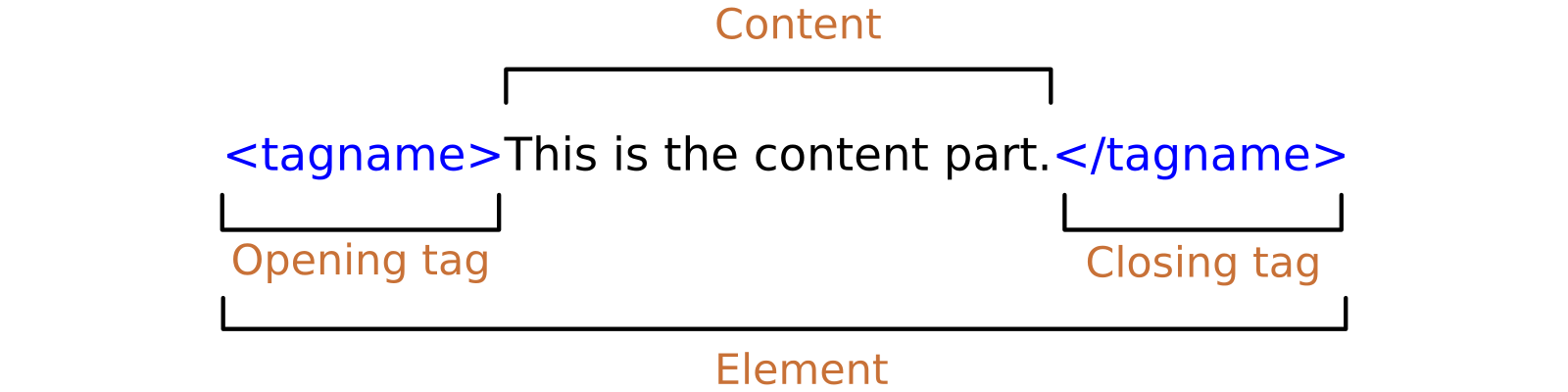
As we mentioned in the previous paragraph, HTML Elements are the building blocks of a webpage. An HTML element is a start tag and an end tag with content in between.
This is an example of an HTML element which represents a big heading as you can see the starter tag is <h1> and the end tag is </h1> and the content hello world goes between them.
The basic elements of an HTML page are:
- A text header, denoted using the
<h1>,<h2>,<h3>,<h4>,<h5>,<h6>tags. - A paragraph, denoted using the
<p>tag. - A horizontal ruler, denoted using the
<hr>tag. - A link, denoted using the
<a>(anchor) tag. - A list, denoted using the
<ul>(unordered list),<ol>(ordered list) and<li>(list element) tags. - An image, denoted using the
<img>tag - A divider, denoted using the
<div>tag - A text span, denoted using the
<span>tag
HTML Attributes#
HTML elements can have attributes, Attributes provide additional information about the element, Attributes come in name/value pairs like lang="ar"

These are some basic HTML attributes:
- The href attribute
HTML links are defined with the
<a>tag. The link address is specified in the href attribute:
- The src Attribute
HTML images are defined with the
<img>tag. The filename of the image source is specified in the src attribute:
- The style Attribute The style attribute is used to specify the styling of an element, like color, font, size etc.
- The title Attribute
Here, a title attribute is added to the
<p>element. The value of the title attribute will be displayed as a tooltip when you mouse over the paragraph:
For a full reference about HTML attributes visit: https://developer.mozilla.org/en-US/docs/Web/HTML/Attributes
JavaScript HTML DOM#
When a web page is loaded, the browser creates a Document Object Model of the page. With the HTML DOM, JavaScript can access and change all the elements of an HTML document.
The HTML DOM model is constructed as a tree of Objects:
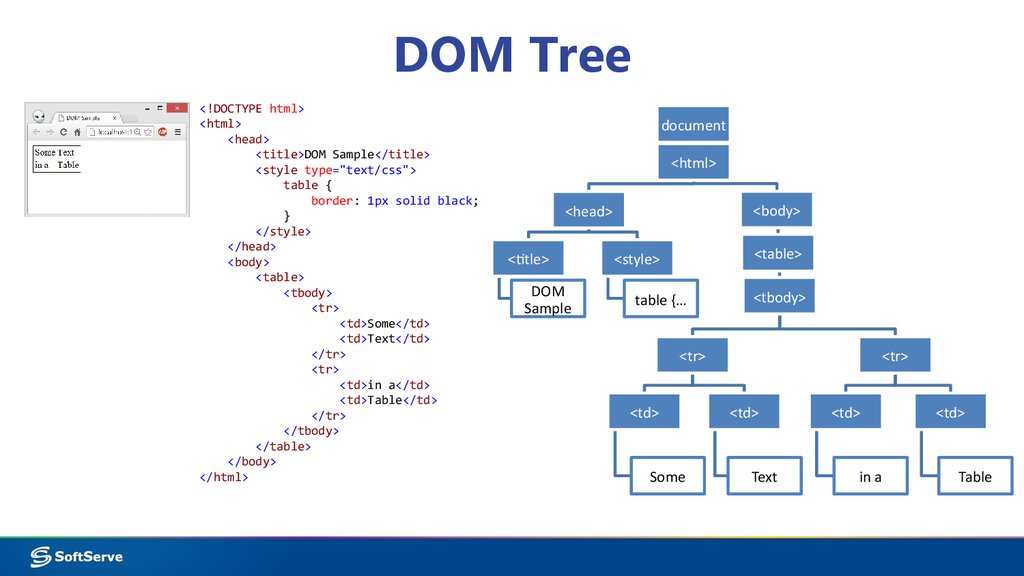
From W3school https://www.w3schools.com/js/js_htmldom.asp
We will learn more about the HTML DOM later in the course but its good to know what is it from now.